
Conditional Candidate Status Rules
Overview
Conditional Candidate Status Rules allow recruiters to build smarter, more dynamic hiring workflows by automatically moving candidates to different statuses based on specific conditions and triggers.
Unlike the original “Move Candidate to Another Status” automation — which only moved candidates after all automations on a status were completed — Conditional Status Rules let you create customized routing logic that responds to real candidate behavior in real time.
This helps hiring teams:
- Reduce manual pipeline management
- Respond faster to candidate engagement
- Prioritize stronger-fit candidates automatically
- Build more personalized recruiting workflows
- Keep hiring pipelines organized and efficient
By automating decision-making throughout the hiring process, recruiters can focus more time on evaluating and engaging top talent instead of manually updating candidate statuses.
Step-by-Step Setup
1. Open a Job Workflow Status
Navigate to the job posting where you want to configure automation rules.
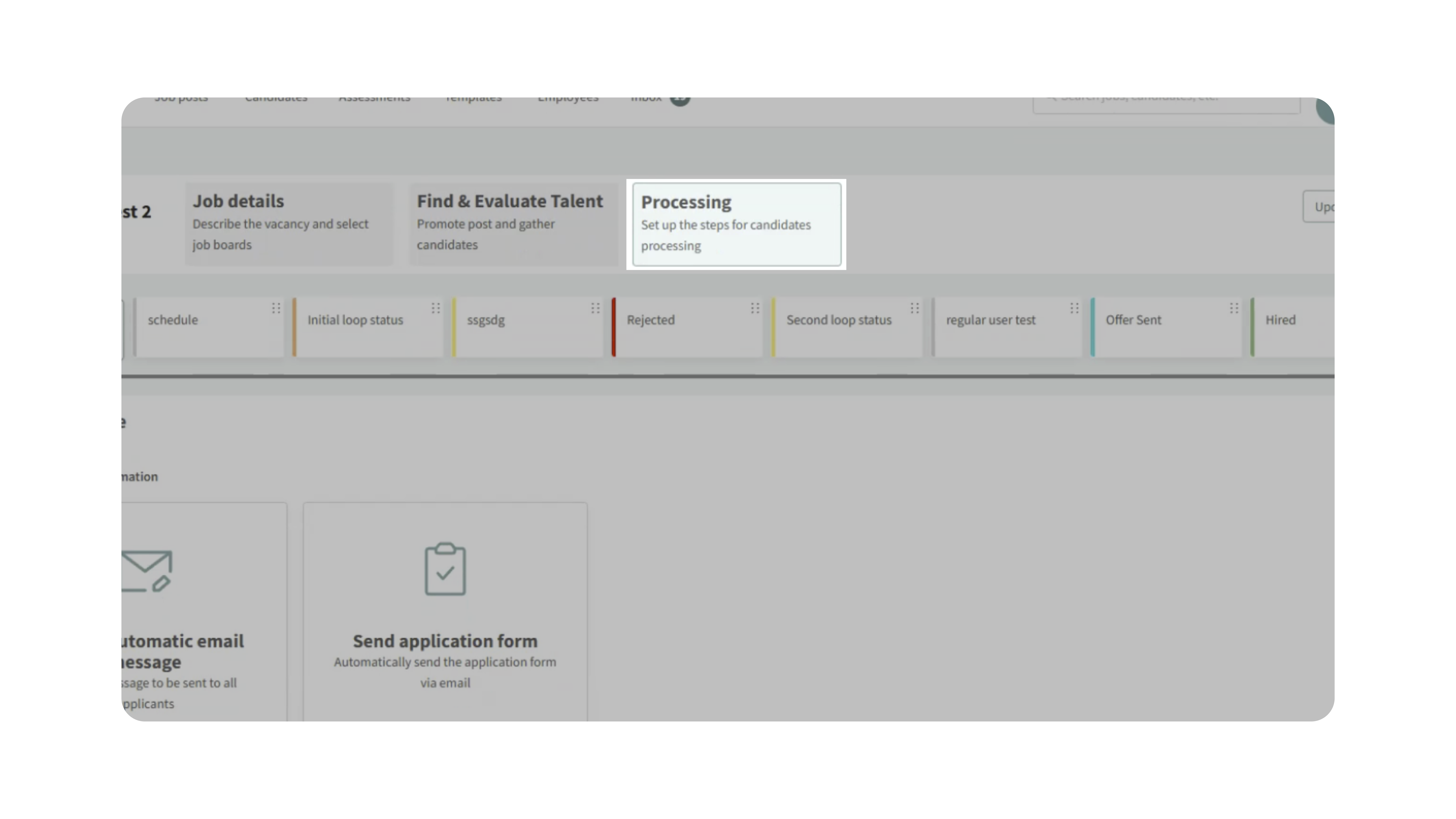
Go to the Processing stage and select the status you want to configure (for example, “New Candidate”).
2. Add the Conditional Automation
Inside the status settings:
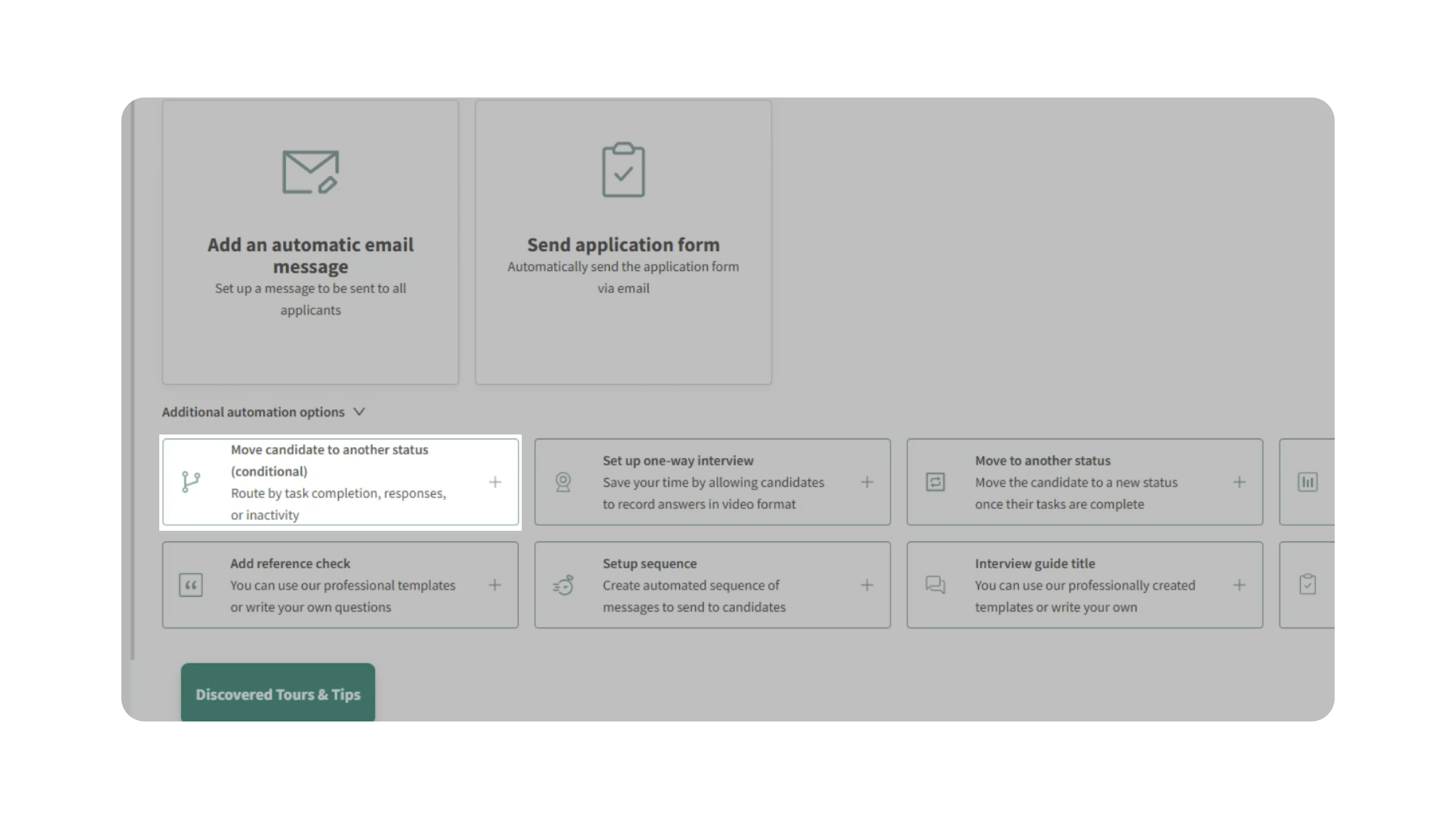
1. Select Move Candidate to Another Status (Conditional)
2. Click Add Rule
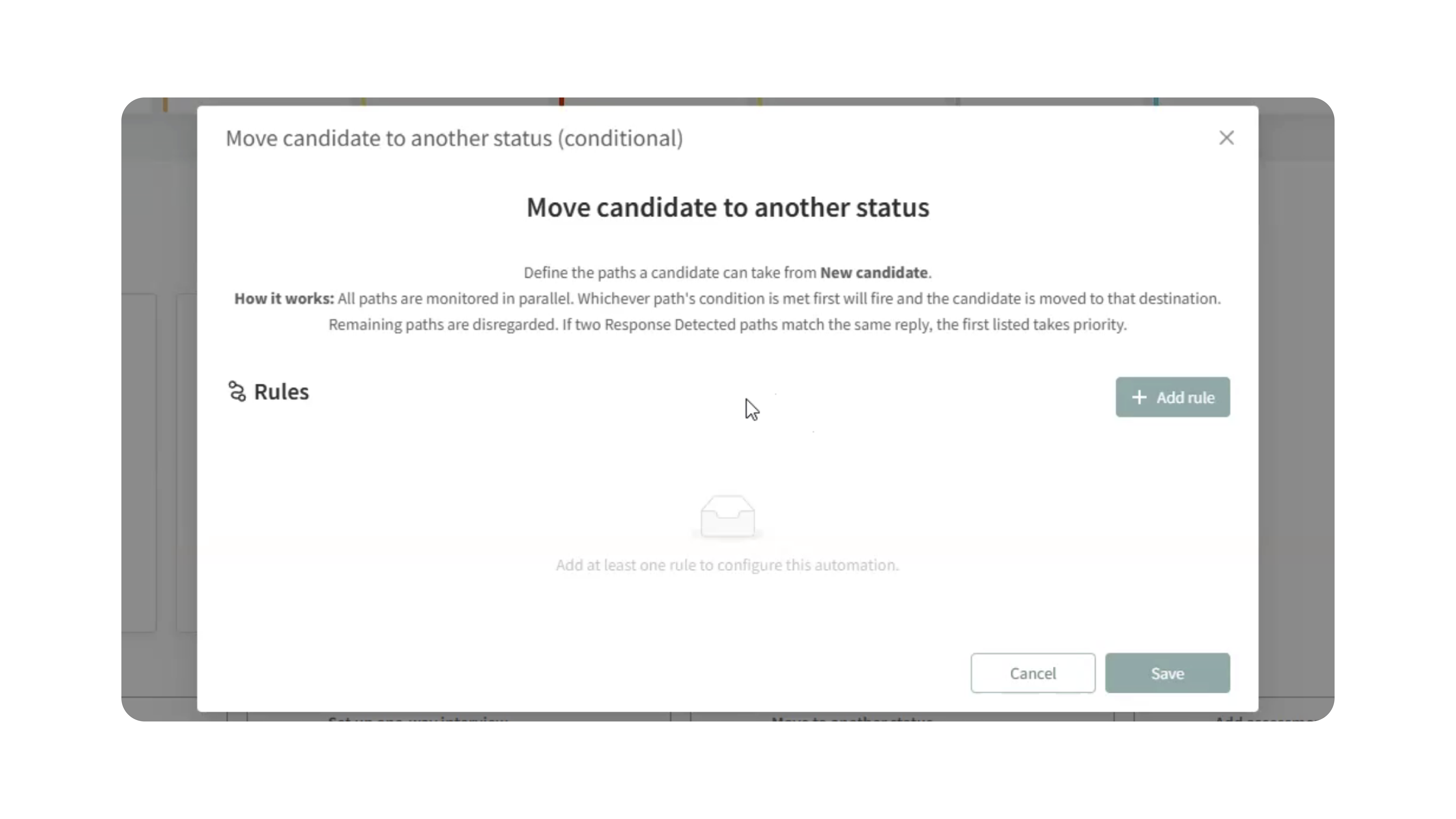
You can create multiple rules for the same status depending on the workflow you want to build.
3. Choose a Rule Type
There are four different rule types available:
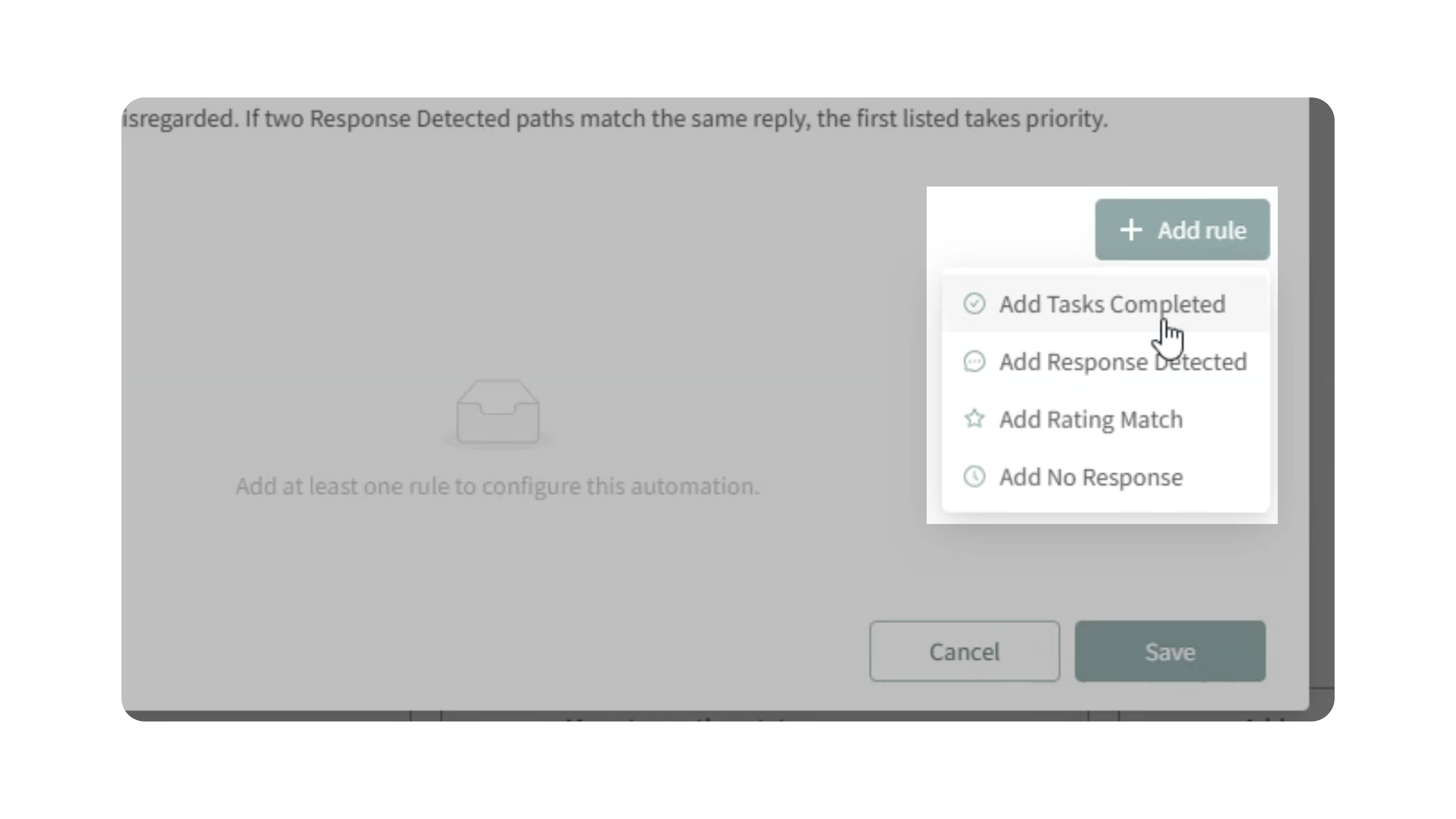
Tasks Completed
Move candidates after completing one or more required tasks.
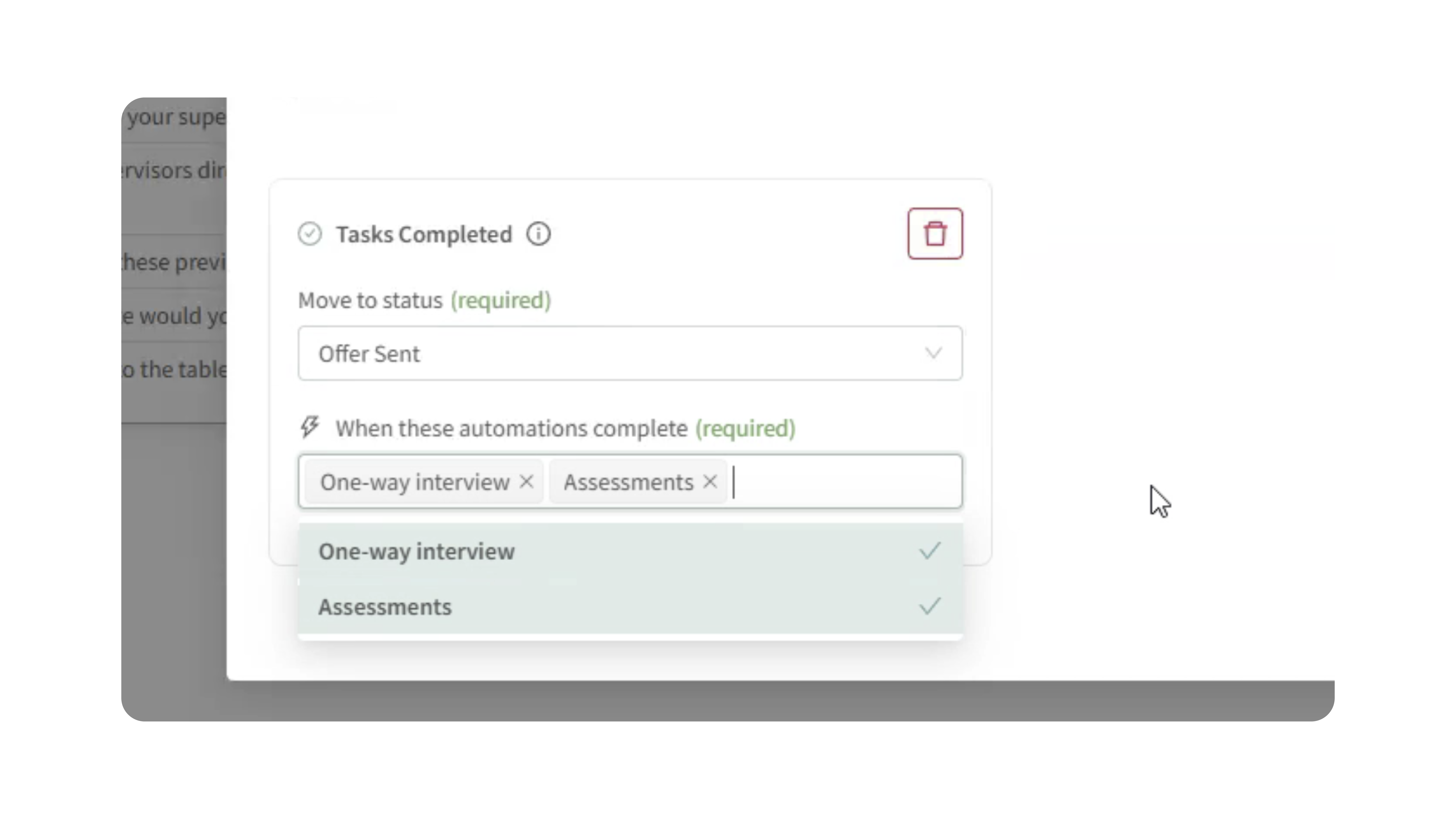
Examples of supported tasks:
- Assessments
- One-way video interviews
- Interview scheduling
You can require:
- Multiple tasks completed together (AND logic)
- Separate rules for different actions (OR logic)
Example:
- If a candidate completes an assessment → move to “Assessment Review”
- If they complete a one-way interview first → move to “Interview Review”
This allows workflows to adapt dynamically depending on candidate actions.
Response Detected
Automatically move candidates when they respond with a specific keyword via email or SMS.
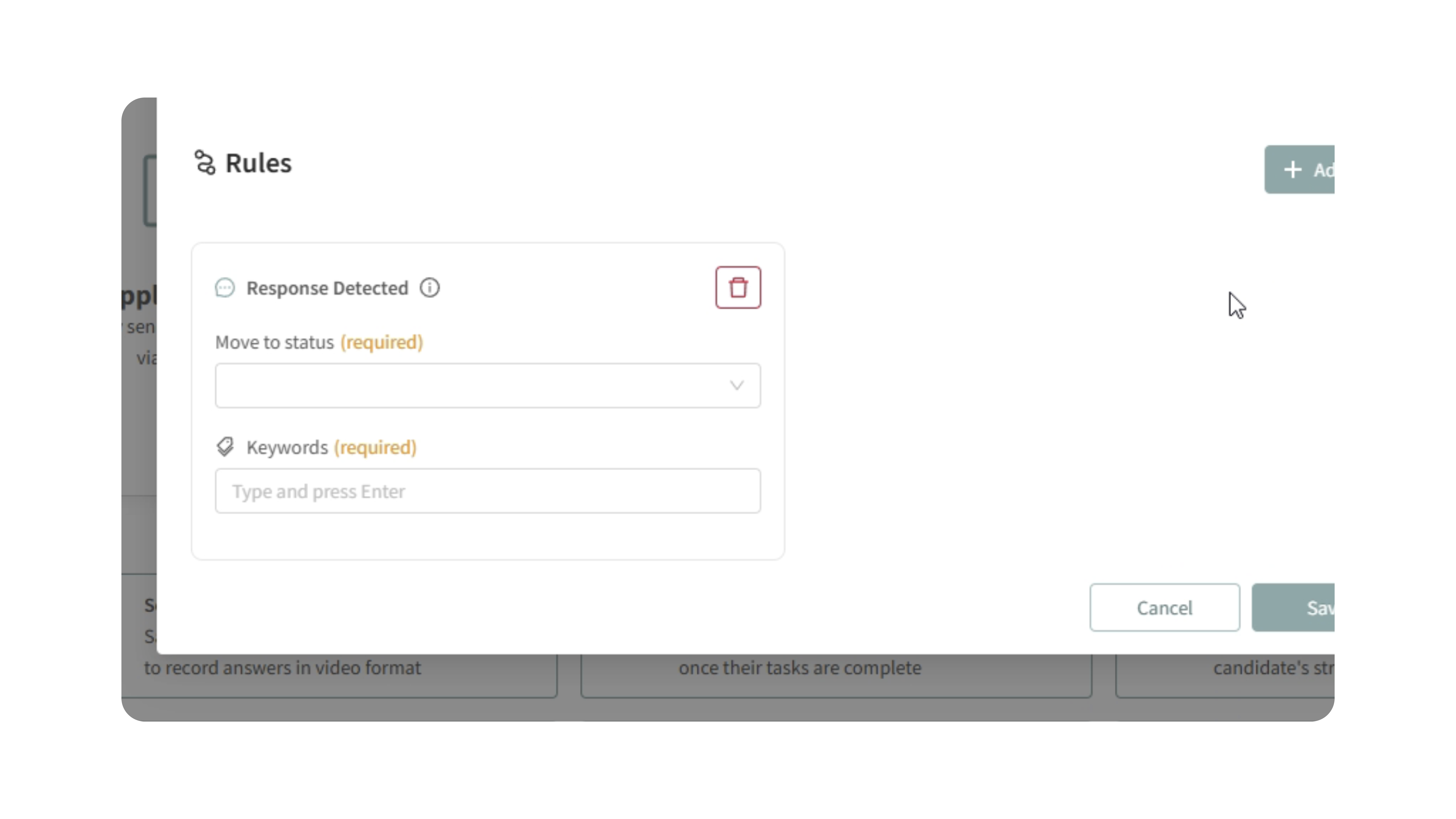
How it works:
- The system checks candidate replies for an exact keyword match
- Matching is case-insensitive
Example:
- Send a message asking candidates to reply “YES” if still interested
- If “YES” is detected, automatically move them to the next stage
This is ideal for engagement checks and candidate confirmations.
Rating Match
Move candidates based on their star rating assigned manually or by Kingsley AI.
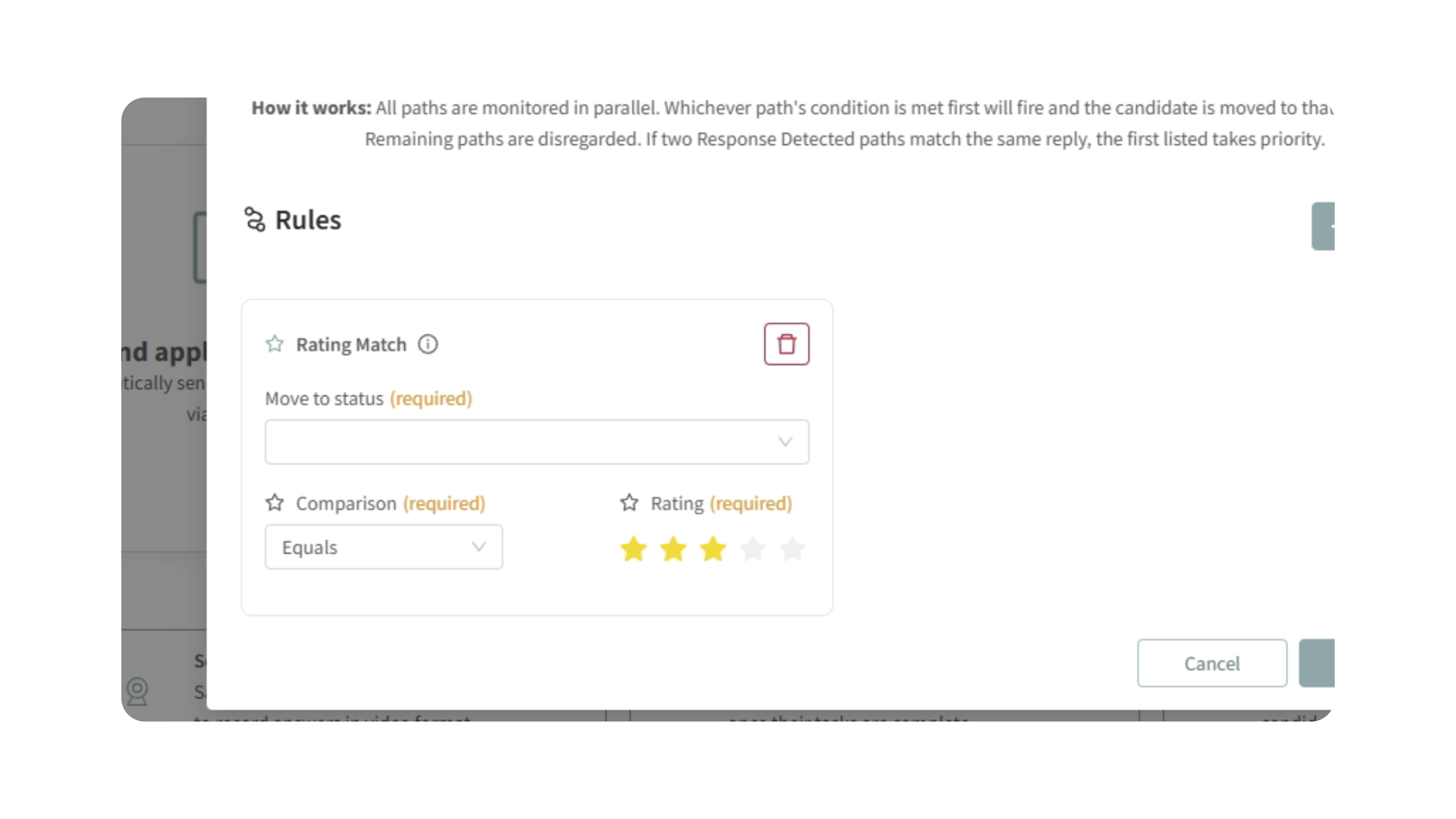
Example:
- Candidates rated below 3 stars automatically move to a secondary review queue
- Higher-rated candidates can be routed directly to interviews or recruiter review
This helps prioritize stronger-fit candidates faster while keeping lower-fit candidates organized separately.
No Response
Automatically move candidates when they have not responded within a specified period of time.
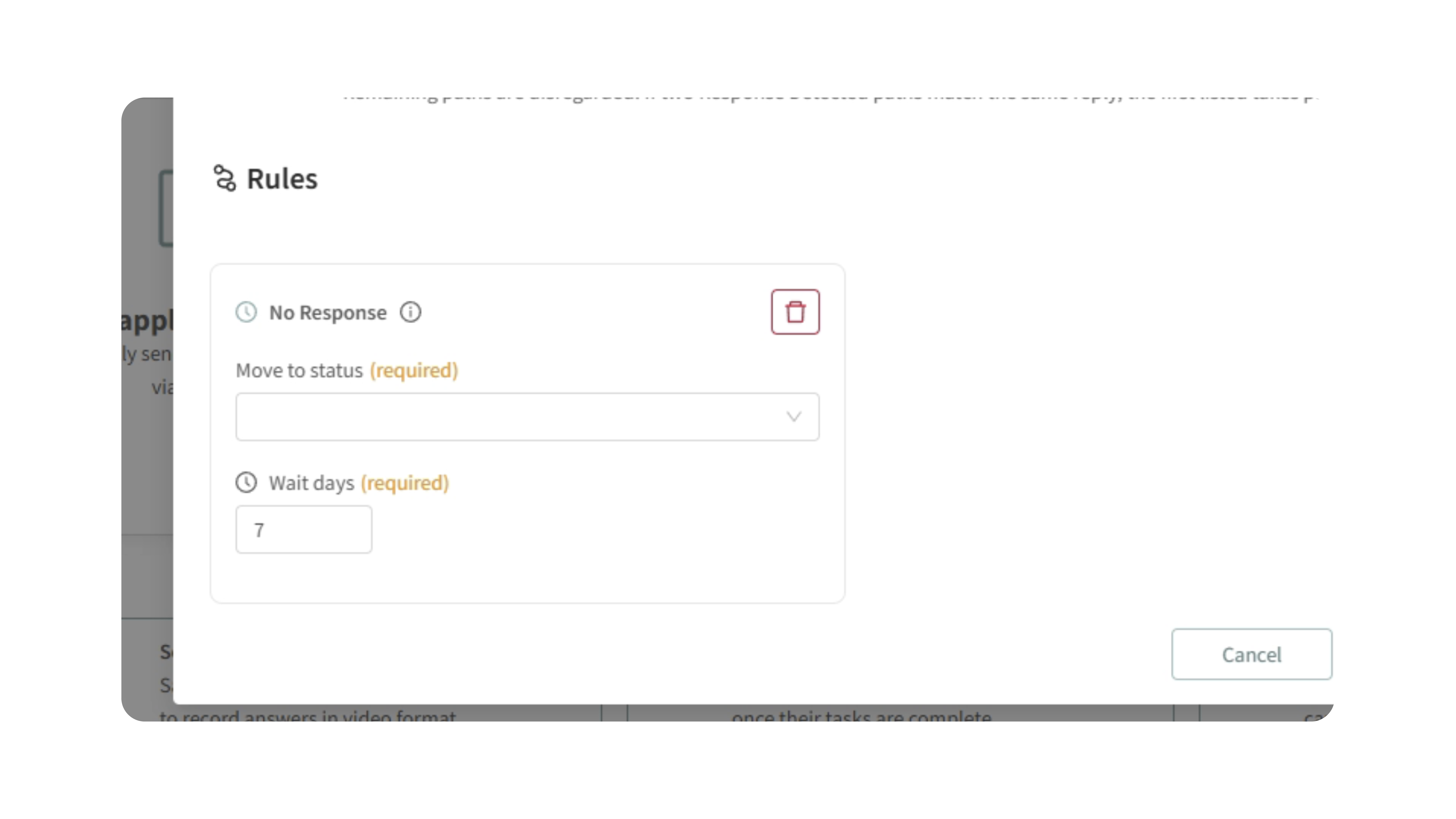
Example:
- If no communication is received after 7 days, move the candidate to “Gone Silent” or “Follow-Up Needed”
This helps keep pipelines clean and ensures inactive candidates do not remain in active stages indefinitely.
4. Configure the Destination Status
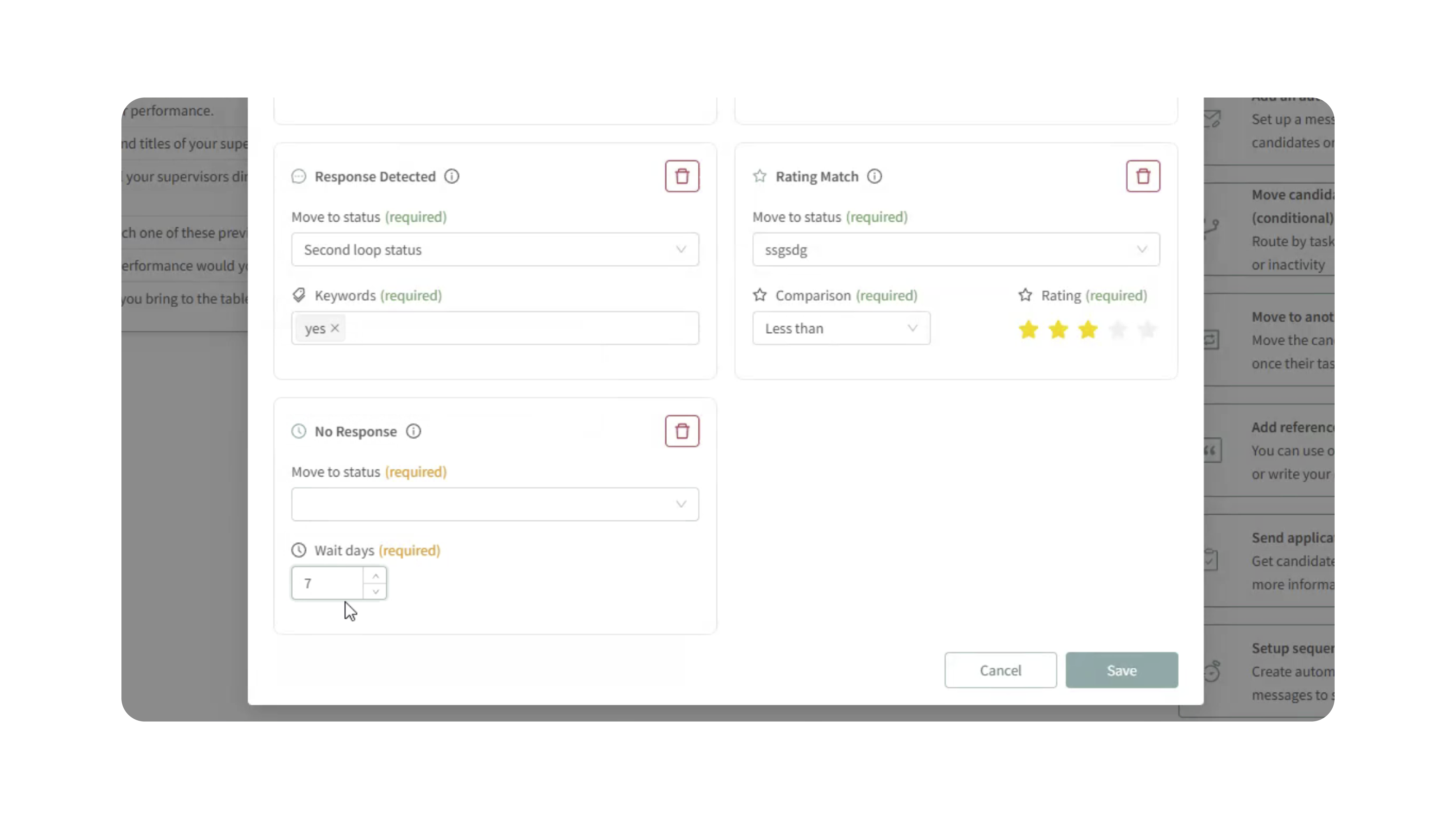
For each rule:
- Select the trigger condition
- Choose the status the candidate should move to once the condition is met
- Save the rule
You can configure multiple rules on the same status to create advanced workflow routing.
5. Save Your Workflow
Once all rules are configured:
- Review the automation logic
- Save the status settings
The automation will begin monitoring candidate activity immediately.
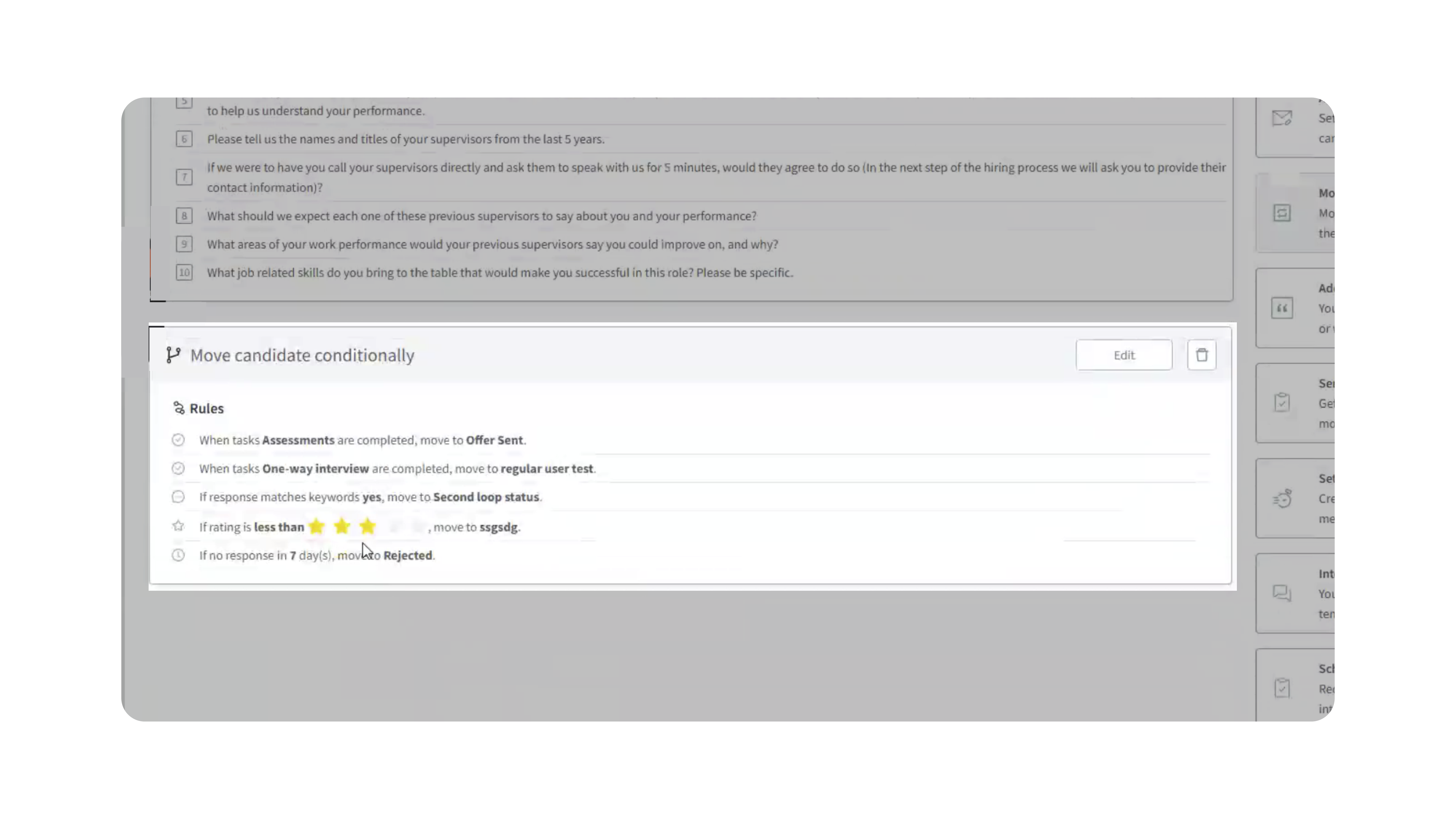
Using Optional Tasks with “Tasks Completed” Rules
If a candidate has both a required task and an optional task in the same status, use Move Candidate to Another Status (Conditional) to control which task actually triggers the move.
For example, if the candidate must complete an IntegrityFirst Assessment but the One-Way Video Interview is optional:
- Open the relevant status in Processing.
- Add Move Candidate to Another Status (Conditional).
- Choose Tasks Completed as the rule type.
- Select the Assessment as the required task.
- Do not include the optional One-Way Video Interview in that rule.
- Choose the destination status.
The candidate will move as soon as the required assessment is completed, even if the optional video interview has not been completed.
Important: The original Move Candidate to Another Status automation waits until all activities in the current status are completed. If an optional One-Way Video Interview is included in that status, it can prevent the candidate from moving forward.
Use Move Candidate to Another Status (Conditional) when only specific activities should control candidate movement.
Why This Matters
Conditional Candidate Status Rules make recruiting workflows significantly more intelligent and scalable.
This helps teams:
- Eliminate repetitive manual status updates
- React instantly to candidate engagement
- Prioritize high-quality candidates automatically
- Create personalized hiring workflows at scale
- Reduce pipeline clutter and inactive candidates
Instead of relying on static workflows, recruiters can build hiring processes that adapt dynamically to real candidate behavior.
Use Cases
- Recruiters: Automatically move engaged candidates forward when they respond to outreach messages or complete assessments.
- Hiring Teams: Prioritize stronger-fit candidates based on Kingsley AI ratings or recruiter scoring.
- High-Volume Hiring: Automatically route inactive candidates into follow-up or archive stages to keep pipelines organized.
- Recruiting Operations: Build advanced workflows that respond differently depending on which candidate action occurs first.
- AI-Assisted Recruiting: Use Kingsley-generated star ratings to automate candidate sorting and prioritization.
Best Practices
- Use clear status names that reflect workflow intent
- Test automations on a small candidate group before deploying broadly
- Use response detection with simple keywords like “YES” or “CONFIRM”
- Avoid overly complex rule combinations during initial setup
- Review star-rating thresholds periodically to align with hiring goals
- Combine conditional routing with assessments and interview automations for stronger workflow efficiency
What Happens Next
Once Conditional Candidate Status Rules are enabled:
- Candidate actions are monitored automatically
- Candidates move between statuses dynamically based on configured conditions
- Recruiters spend less time manually managing workflows
- Hiring pipelines stay cleaner, faster, and more organized
With Conditional Candidate Status Rules, your team can automate decision-making throughout the recruiting process — helping you identify, engage, and advance the right candidates more efficiently.